
Right Triangle Calculator
Please provide 2 values below to calculate the other values of a right triangle. If radians are selected as the angle unit, it can take values such as pi/3, pi/4, etc.

The Right Triangle Calculator: Why Your “Simple” Tool Is Probably Hiding the Wrong Angle
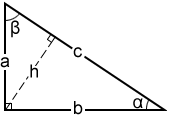
A right triangle calculator solves for unknown sides or angles given any two inputs among the two legs (a, b), hypotenuse (c), or one acute angle. Most users reach for it to avoid manual square-rooting, but the real value lies in knowing which two inputs to feed it—and recognizing when your real-world triangle isn’t actually right-angled at all, a misjudgment that propagates systematic error into construction layouts, screen coordinate mappings, and navigation vectors.
The Hidden Variable: Input Pair Selection Determines Your Error Surface
Here’s the non-obvious truth. Not all input pairs to a right triangle calculator are equally trustworthy.
| Input Pair | What You Solve For | Error Propagation Risk | Best Used When |
|---|---|---|---|
| Both legs (a, b) | Hypotenuse, both angles | Lowest; Pythagorean sum squares errors | Surveying, carpentry, physical layout |
| One leg + hypotenuse (a, c) | Other leg, both angles | Moderate; subtraction under radical amplifies uncertainty | Diagonal bracing, screen diagonal from width |
| One leg + one angle (a, A) | Other leg, hypotenuse, other angle | Highest; trigonometric functions amplify small angle errors near 0° or 90° | Slope calculations, roof pitch |
The asymmetry matters. If you measure a 45° angle with ±1° uncertainty, your opposite leg estimate shifts roughly 3.5%. But measure 5° with that same ±1° uncertainty, and your leg ratio uncertainty explodes past 20%. The calculator returns a number. It does not flag that your protractor precision just destroyed your result.
This is why professional surveyors prefer measuring two distances over one distance and one angle whenever terrain permits. The calculator cannot correct for your instrument’s weakness. You must choose inputs strategically.
Core Relationships: What the Calculator Computes
The underlying mathematics is the Pythagorean theorem and its trigonometric extensions. For right triangle with right angle at C:
a2 + b2 = c2
$\sin(A) = \frac{a}{c}, \quad \cos(A) = \frac{b}{c}, \quad \tan(A) = \frac{a}{b}$
Where A and B are the acute angles, satisfying A + B = 90°.
The calculator inverts these relations based on your supplied pair. Feed (a, b), and it computes:
$c = \sqrt{a^2 + b^2}, \quad A = \arctan\left(\frac{a}{b}\right), \quad B = 90° - A$
Feed (a, c), and it must first verify a < c (otherwise reject as impossible), then:
$b = \sqrt{c^2 - a^2}, \quad A = \arcsin\left(\frac{a}{c}\right)$
The arcsine and arctangent functions return principal values. The calculator handles quadrant selection automatically because the right triangle constraint forces A, B ∈ (0°, 90°).
EX: Walkthrough with Hypothetical Sample Inputs
Problem: A ramp must rise 0.5 m over a horizontal run. You measure the rise as 0.50 m and the ramp’s diagonal length as 3.20 m. Find the horizontal run and ramp angle.
Step 1 — Validate inputs. Check a < c: 0.50 < 3.20. Valid. (If you had measured 3.20 m horizontal and 0.50 m rise, you’d use both legs instead—see trade-off below.)
Step 2 — Compute missing leg b.
$b = \sqrt{c^2 - a^2} = \sqrt{3.20^2 - 0.50^2} = \sqrt{10.24 - 0.25} = \sqrt{9.99} \approx 3.161 \text{ m}$
Step 3 — Compute angle A (ramp angle above horizontal).
$A = \arcsin\left(\frac{0.50}{3.20}\right) = \arcsin(0.15625) \approx 8.98°$
Step 4 — Sanity check. For small angles, a ≈ c·A (radians). 0.15625 rad ≈ 8.95°. Close enough. The ramp is shallow, as expected for accessibility compliance.
Trade-off exposed: You chose leg + hypotenuse because diagonal length is easier to tape-measure on a sloped surface than horizontal run is to level. But you paid: a ±2 mm error in your 3.20 m diagonal becomes ±3.2 mm error in computed b, while that same ±2 mm in a directly measured horizontal run would propagate as only ±2 mm. Direct leg measurement is more robust. Use the hypotenuse input only when physical access forces it.
Edge Cases and Failure Modes
Right triangle calculators fail silently in predictable ways. Watch for these:
The obtuse triangle masquerade. Three side lengths 2, 3, 4 satisfy triangle inequality but not Pythagorean: 2² + 3² = 13 ≠ 16 = 4². If you force these into a right triangle calculator by labeling 4 as “hypotenuse,” you get fictional angles. Always verify a² + b² ≈ c² within measurement tolerance before trusting angle outputs.
Floating-point catastrophe in near-degenerate triangles. When one leg is orders of magnitude smaller than the other, say a = 1, b = 10⁶, computing c via √(1 + 10¹²) in limited precision returns exactly 10⁶, losing the 1 entirely. The calculator’s displayed angle A becomes 0.0000°. For such extreme ratios, use hypotenuse-angle inputs or high-precision libraries.
Ambiguous angle specification. Some calculators accept angles in degrees, others in radians, occasionally with gradians as a third option. A 1.047 input interpreted as 1.047° versus 1.047 rad (≈60°) produces catastrophes. Verify mode before entering.
Connected Tools and Decision Forks
After using this calculator, your next tool depends on what you discovered:
| If your result… | Your next step | Tool to use |
|---|---|---|
| Needs scaling to a blueprint or CAD model | Apply scale factor; check for integer ratio simplification | Ratio calculator, greatest common divisor tool |
| Involves 3D spatial coordinates | Extend to direction cosines or vector magnitude | 3D distance calculator, spherical coordinates converter |
| Must meet a regulatory slope limit (e.g., ADA 1:12 max) | Verify rise:run ratio against code; your computed angle may need rounding | Slope percentage calculator |
| Shows your “right” triangle fails Pythagorean check | Reclassify as oblique; use Law of Cosines | General triangle calculator |
What to Do Differently
Stop treating the right triangle calculator as a mere square-root button. Before entering numbers, explicitly write down your measurement uncertainties and cross-check which input pair minimizes their propagation. If you measured a diagonal because it was convenient, ask whether a second direct leg measurement—perhaps with a laser level or water level—would cost ten minutes now but save hours of rework later. The calculator computes exactly what you ask. Your judgment determines whether you asked the right question.