
Square Footage Calculator
The Square Footage Calculator estimates the square footage of a lot, house, or other surfaces in several common shapes. If the surface is complex in shape, it may be possible to section the surface into simple shapes and add their square footages together.

Rectangle
 |
Rectangle Border
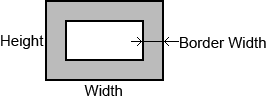 |
Circle
 |
Ring
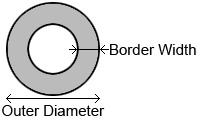 |
Triangle with Edge Lengths

|
Triangle with Base & Height
 |
Trapezoid
 |
Sector
 |
Parallelogram
|
Square footage is the area of a surface in square feet, but the calculator is only useful if you match the measurement to the decision you are making: flooring, paintable floor area, rentable area, or material ordering. The common mistake is assuming one “room size” serves every purpose. It does not. A good square-footage calculator helps you turn lengths into area, combine simple shapes, and avoid costly errors from rounding, skipped cutouts, or measuring the wrong boundary. Measure the boundary that matches the purchase decisionA square-footage calculator exists because real decisions are rarely about geometry alone. You are deciding how much material to buy, how to compare spaces, whether a layout change is feasible, or how to estimate labor. That is why the first question is not “What is the room size?” but “Which boundary counts?” For flooring, you usually care about the horizontal floor surface to be covered. For occupancy planning, you may care about usable open area after fixed obstructions. For pricing comparisons, some users care about gross area, while installers often care about net cover area. Same room. Different answers. Mathematically, area is denoted by (A). For a rectangle, [ A = L W ] where (L) is length and (W) is width, both measured in feet. If dimensions are taken in inches, convert first: [ = ] If a plan uses mixed units, convert before multiplying. A frequent error is multiplying feet by inches directly, which produces a number with no valid square-foot interpretation. The second hidden variable is decomposition. Many rooms are not rectangles; they are unions of rectangles, minus closets, stair voids, or built-ins. In notation, if a floor can be split into pieces, [ A_{} = A_{} - A_{} ] This is the real engine behind most square-footage calculators. You are not “estimating”; you are partitioning a complex region into solvable shapes. Here is the trade-off most users miss: measuring more detail increases accuracy, but only if your measurements are stable. If one wall bows or a corner is not square, adding many tiny segments can amplify error. In practical terms, one bad measurement can distort the total more than several minor rounding choices. That is why the calculator is sensitive to outliers: a single dimension entered as 18 ft instead of 13 ft changes the result far more than rounding 13.4 to 13.5. If you are working from a small sample of measurements rather than a full plan, the estimate is also biased by what you chose to measure and what you ignored. Use this quick-reference logic:
That last row matters. Waste allowance is not geometry. It is a procurement decision. If you add it before you have the correct net area, you hide the real number you should compare across materials, bids, and layouts. EX: Calculate an irregular room step by step without hiding the assumptionsSuppose you have a hypothetical L-shaped room for flooring. You measure it as two rectangles:
Inside the larger section is a fixed closet footprint you will not floor:
EX: Step-by-step calculation
So the net square footage is 162 square feet. Now the judgment step. If you are comparing two flooring products, compare them against 162 ft², not against an inflated purchase number. If you are ordering material, then decide whether to add extra coverage for cuts, pattern matching, breakage, or future repairs. The asymmetry is real: under-ordering can stop a job entirely, while over-ordering ties up money and may leave unusable remnants. For plain layouts, the extra amount is often less critical than for diagonal layouts or materials with directional patterns, because the offcuts are less reusable. The calculator gives area; your layout determines how forgiving that area is in practice. A second non-obvious issue is whether recesses count. Consider a bay window nook or a shallow alcove. Geometrically, yes, it contributes area. Operationally, maybe not in the same way, because installation labor can rise faster than area when the shape becomes fragmented. Two rooms can have the same square footage and very different effort. That is why square footage calculators connect naturally to related tools: perimeter calculators for trim, tile estimators for piece counts, paint calculators for vertical surfaces, and cost estimators that separate materials from labor. Common failure points are predictable:
If your room contains curves or angled walls, the same principle holds: approximate with simpler shapes, but record the approximation. That way you know whether the result is a precise computation or a planning estimate. Precision without a stated boundary is false confidence. Use the calculator as a decision filter, not a number generatorAfter reading this, do one thing differently: compute and save two numbers every time—net measured area and purchase area after your own adjustment. Keeping those separate forces clarity, makes comparisons cleaner, and prevents the most expensive error in square-footage work: using one area figure for a decision it was never meant to support. |